Wisteria Vines and Floral Silhouettes in Digital Design: A Practical Guide to Vector Assets
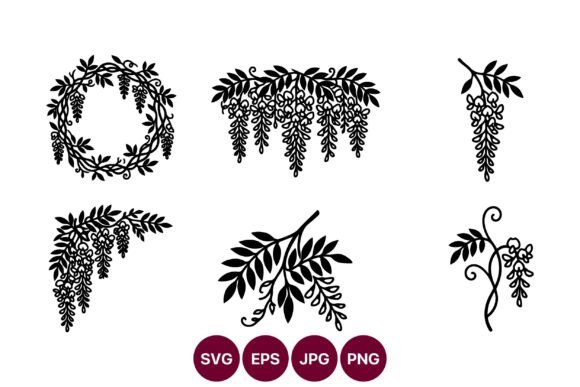
In the evolving landscape of digital crafting and graphic design, the demand for versatile, high-quality assets has never been higher. Among the myriad of botanical themes available, Wisteria Vines and Floral Silhouettes in circular and hanging layouts have emerged as a distinctive choice for creators seeking elegance without visual clutter. This specific collection offers a curated set of black wisteria vines and floral silhouettes, designed explicitly for decorative use across various mediums. Understanding the nuances of these assets—particularly when they are provided in multiple formats like SVG, PNG, JPG, and EPS—is crucial for designers, hobbyists, and small business owners who need reliability and scalability in their projects.
The appeal of this collection lies not just in its aesthetic but in its technical execution. The artwork is characterized by high-contrast black silhouettes against transparent or white backgrounds, ensuring 100% vector precision in SVG and EPS formats. This allows for sharp results at any size, from tiny jewelry tags to large-scale wall decals. For those evaluating whether this resource fits their workflow, it is essential to look beyond the surface beauty and consider the practical implications of file types, licensing, and design flexibility compared to other available options.
Understanding the Distinctive Features of Wisteria Silhouettes
What sets Wisteria Vines and Floral Silhouettes in this particular arrangement apart from generic floral clipart is the intentional focus on structure and negative space. Wisteria, with its cascading clusters and twisting vines, presents a unique challenge in silhouette form. Poorly executed vectors can result in muddy details where petals merge into indistinguishable blobs. However, high-quality collections prioritize clean paths and distinct separation between elements. This ensures that when the design is cut using a vinyl cutter or printed on fabric, the intricate details remain intact.
The inclusion of both circular and hanging layouts provides immediate versatility. Circular arrangements are ideal for monograms, logos, and framed art, offering a contained, balanced composition. Hanging layouts, conversely, mimic the natural growth pattern of wisteria, making them perfect for borders, wedding invitations, and vertical banners. By offering these pre-composed layouts, the collection saves designers significant time that would otherwise be spent manually arranging individual elements to achieve visual harmony.
The Importance of Multi-Format Delivery
A critical factor in evaluating any digital asset pack is the range of file formats included. This collection downloads as a ZIP folder containing SVG, PNG, JPG, and EPS files. Each format serves a specific purpose in the design ecosystem:
- SVG (Scalable Vector Graphics): Ideal for web use and cutting machines like Cricut or Silhouette. SVGs retain quality at any zoom level and allow for easy color manipulation within design software.
- EPS (Encapsulated PostScript): The standard for professional print shops and Adobe Illustrator users. EPS files ensure that the vector data remains editable and crisp for large-format printing.
- PNG (Portable Network Graphics): Best for digital projects requiring transparency. These raster images are ready to drop into Canva, Photoshop, or social media templates without background removal hassle.
- JPG (Joint Photographic Experts Group): Suitable for quick previews or projects where a white background is acceptable, such as standard document inserts or basic printing needs.
Having access to all four formats means the user is not locked into a single workflow. Whether you are a DIY enthusiast using a home cutting machine or a professional graphic designer preparing files for offset printing, the asset pack accommodates your technical requirements without the need for third-party conversion tools, which often degrade quality.
Comparing Vector Silhouettes to Other Design Approaches
When deciding on design resources, creators often weigh vector silhouettes against watercolor illustrations, photographic elements, or hand-drawn sketches. Each style has its place, but Wisteria Vines and Floral Silhouettes in high-contrast black offer specific advantages in terms of usability and cost-effectiveness.
Watercolor florals, while beautiful, can be difficult to reproduce consistently across different print mediums. Colors may shift, and fine details can get lost in low-resolution prints. Photographs require careful lighting and editing to remove backgrounds, and even then, they may not scale well for large formats without pixelation. In contrast, vector silhouettes are resolution-independent. They are mathematically defined shapes, meaning they remain perfectly sharp whether scaled to one inch or ten feet. This makes them superior for applications requiring precision, such as laser cutting, vinyl decaling, or screen printing.
Furthermore, the minimalist nature of black silhouettes offers a timeless aesthetic that does not clash with existing color palettes. If a brand uses specific corporate colors, a black silhouette can easily be recolored to match, whereas a multi-colored watercolor image might require extensive editing to integrate seamlessly. This flexibility makes the wisteria collection a more adaptable resource for long-term brand consistency.
Evaluating Tradeoffs and Limitations
Despite their many benefits, silhouette-based designs are not a universal solution. The primary tradeoff is the lack of texture and depth. If a project requires a realistic, organic feel with shading and gradient transitions, a flat black silhouette may appear too stark or simplistic. In such cases, designers might need to layer the silhouette with textured backgrounds or combine it with other elements to add visual interest.
Additionally, while vector files are editable, modifying complex paths requires a certain level of proficiency with software like Adobe Illustrator or Inkscape. Users unfamiliar with node editing may find it challenging to adjust the shape of individual vines or flowers. However, for most decorative purposes, the pre-arranged layouts provided in the collection eliminate the need for deep editing, making them accessible to beginners while still offering raw materials for advanced users.
Best-Fit Situations for Wisteria Vine Assets
Identifying when to use Wisteria Vines and Floral Silhouettes in your projects can significantly enhance the final output. These assets excel in scenarios where clarity and elegance are paramount. Consider the following use cases:
- Wedding and Event Stationery: The romantic cascade of wisteria is a classic choice for weddings. Silhouettes work beautifully on save-the-dates, menu cards, and table numbers, especially when paired with elegant typography.
- Home Decor and Wall Art: High-contrast black and white designs are a staple of modern farmhouse and minimalist decor. These vectors can be used to create large canvas prints, metal wall art, or wooden signs via CNC routing.
- Apparel and Textile Design: Screen printing and heat transfer vinyl (HTV) benefit greatly from simple, bold shapes. The clean lines of wisteria silhouettes ensure that designs remain durable and visible after multiple washes.
- Branding and Logos: For businesses in the beauty, wellness, or boutique sectors, a wisteria motif can convey sophistication and natural beauty. The vector format ensures the logo looks professional on everything from business cards to storefront signage.
Making an Informed Decision
Choosing the right digital asset involves balancing aesthetic preference with technical necessity. If your project demands scalability, ease of customization, and a clean, timeless look, Wisteria Vines and Floral Silhouettes in this collection represent a strong investment. The inclusion of both vector and raster formats covers nearly every common design scenario, reducing the friction between concept and execution.
However, if your goal is to create hyper-realistic botanical illustrations or if you require complex color gradients out of the box, you may need to supplement these silhouettes with other resources or opt for a different style entirely. It is also worth considering the learning curve associated with vector software if you plan to modify the base files extensively.
Ultimately, the value of this collection lies in its versatility and professional-grade quality. By providing high-contrast, 100% vector artwork in a comprehensive file package, it empowers creators to produce polished results efficiently. Whether you are designing for a client or creating personal crafts, understanding the strengths and limitations of these silhouettes allows you to leverage them effectively, ensuring your final product meets both aesthetic and functional standards.